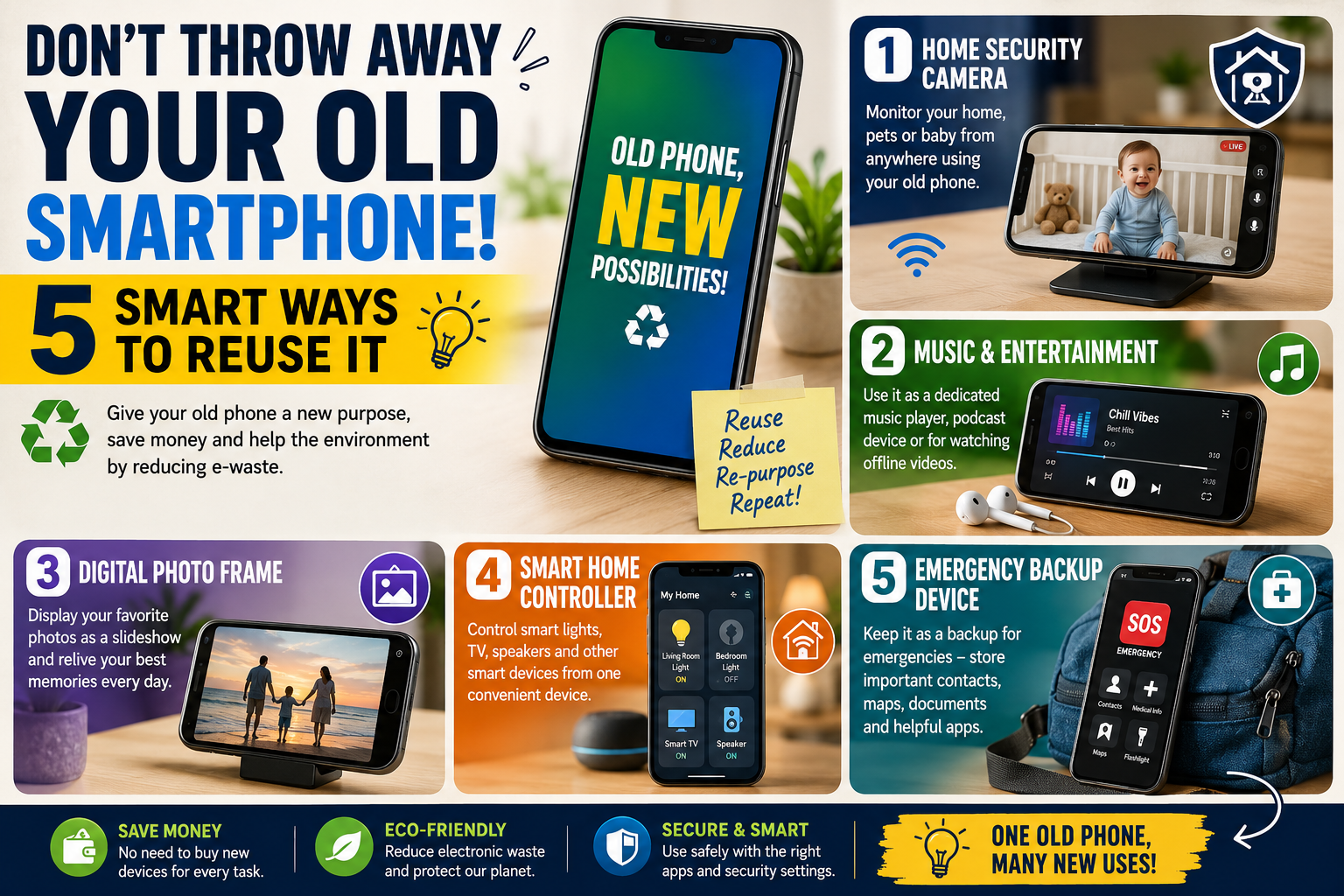
Don’t Throw Away Your Old Smartphone: 5 Smart Ways to Reuse It
Every year, millions of people replace their smartphones with newer models offering better cameras, faster processors, improved batteries, and more advanced features. But once the new phone arrives, the old one often ends up forgotten in a drawer.
Before you throw it away, consider this: your old smartphone may still be surprisingly useful.
Even if it is too slow for daily use, has a weaker battery, or no longer receives the latest software updates, it can still perform many simple tasks. With a stable Wi-Fi connection and a few useful apps, an old smartphone can become a security camera, music player, digital photo frame, smart home controller, or emergency backup device.
Reusing an old phone can also help you get more value from a device you have already purchased. Instead of immediately turning it into electronic waste, you can give it a second life.
In this article, we will explore five smart and practical ways to reuse your old smartphone and explain how to prepare it safely before using it for a new purpose.
Why You Should Reuse Your Old Smartphone
Smartphones are powerful small computers. Even an older device may still have useful features such as a camera, microphone, speaker, display, Wi-Fi connection, Bluetooth, GPS, and storage.
You may no longer want to use the device as your primary phone, but those features can still be valuable.
For example, an old phone with a working camera can monitor a room. A device with good speakers can become a dedicated music player. A phone with a bright display can show photos, calendars, or useful information.
Reusing electronics can also be a practical way to reduce unnecessary waste. However, if your phone is damaged beyond use, has a swollen battery, or presents another safety concern, do not continue using it. Follow appropriate local electronics recycling or disposal guidance.
Before turning your old phone into something new, take a few important steps.
How to Prepare an Old Smartphone Before Reusing It
Start by backing up anything important from the device.
Transfer your photos, videos, contacts, documents, and other personal files to your new phone, computer, or preferred cloud storage service. Once you have confirmed that your important data has been copied safely, remove accounts and unnecessary personal information from the old device.
You should also:
- Update the operating system if updates are still available.
- Remove apps you no longer need.
- Check the battery and charging cable for damage.
- Use a screen lock if the device will still contain personal information.
- Install only the apps required for its new purpose.
- Connect the phone to a secure Wi-Fi network.
A clean, simplified device can often perform its new job more smoothly than a phone overloaded with old apps and files.
Now, let’s look at five smart ways to reuse your old smartphone.
1. Turn Your Old Smartphone Into a Home Security Camera
One of the most useful ways to reuse an old smartphone is to turn it into a simple home monitoring camera.
Most smartphones already have a built-in camera, microphone, Wi-Fi connection, and display. With a compatible monitoring app, the phone can be placed in a suitable location to watch a room, entrance, pet area, or other indoor space.
You can position the phone on a stable stand and connect it to power for longer use.
For example, you might use an old smartphone to monitor:
- Your front door area from inside the home
- A baby or child’s room
- A pet while you are in another room
- A home office
- An indoor storage area
The exact features will depend on the app and device you choose. Some apps may offer motion alerts, live viewing, audio features, or cloud storage.
However, privacy should always come first. Do not place a camera in private areas where people reasonably expect privacy, and make sure anyone affected by the monitoring is aware of it when appropriate.
A simple setup can include:
- An old smartphone with a working camera.
- A stable Wi-Fi connection.
- A secure monitoring app.
- A phone stand or stable mounting position.
- A reliable power source.
This can be an excellent way to turn an unused device into something practical.
2. Use It as a Dedicated Music and Entertainment Device
If your old smartphone still has a working screen, speakers, headphone support, or Bluetooth, it can become a dedicated entertainment device.
Instead of filling your main phone with downloaded music, podcasts, videos, and offline content, you can use the old device specifically for entertainment.
Load it with your favorite music, podcasts, audiobooks, or downloaded videos and keep it connected to Wi-Fi when needed.
A dedicated entertainment phone can be useful for:
- Listening to music while exercising
- Playing podcasts while cooking
- Listening to audiobooks
- Watching videos during travel
- Connecting to Bluetooth speakers
- Keeping entertainment separate from your main phone
This can also reduce distractions.
For example, if your primary phone constantly receives work messages, social media notifications, and emails, using a separate device for music or exercise may help you focus on the activity.
An old smartphone can also become a useful travel companion. You can download entertainment before a trip and use the device without constantly draining the battery of your primary phone.
If the device has expandable storage, it may be able to hold an even larger collection of offline media.
3. Turn It Into a Digital Photo Frame
Your old smartphone may have a small screen compared with a television or computer monitor, but it can still display photos beautifully.
Instead of leaving thousands of family pictures hidden inside cloud storage or on a computer, turn the old phone into a digital photo display.
Place the device on a desk, bookshelf, bedside table, or another safe location and use a photo slideshow or compatible gallery application.
You can create different collections, such as:
- Family memories
- Travel photographs
- Wedding pictures
- Children’s photos
- Nature photography
- Special events
- Inspirational images
A digital photo frame can make your old smartphone feel completely new.
If the phone supports automatic charging and can remain safely connected to power, it can display images for extended periods. However, be mindful of battery health and heat. Avoid covering the phone or placing it where it may overheat.
You can also use the device as an information display.
Depending on the apps and settings available, it may show:
- The time
- Calendar events
- Weather information
- Reminders
- To-do lists
- Photos
This makes an old phone useful as a small personal dashboard.
4. Create a Smart Home Remote Control
Many homes now use smart televisions, streaming devices, smart lights, speakers, security systems, and other connected products.
Instead of installing every related application on your main phone, you can dedicate an old smartphone to controlling compatible smart devices.
Place it in a convenient central location, such as the living room or bedroom.
Your old phone could become a control center for:
- Smart lights
- Smart plugs
- Smart speakers
- Streaming devices
- Smart televisions
- Compatible home security devices
- Other connected home products
The main advantage is convenience.
Imagine having a single device that stays in your living room and is already configured with the apps needed to control your entertainment and smart home equipment.
Family members may also find it easier to use a dedicated device instead of asking to use someone’s personal phone.
Before setting up an old phone as a smart home controller, make sure it is protected with appropriate security settings. Remove unnecessary accounts and apps, use a secure Wi-Fi network, and keep the device software updated whenever updates remain available.
A simple device dedicated to one task may also be easier to manage.
5. Keep It as an Emergency Backup Device
Your old smartphone can also be useful as an emergency backup device.
Even without a regular mobile plan, many smartphones can still connect to Wi-Fi. Depending on the device, region, network availability, and emergency calling requirements, emergency calling capabilities may also differ.
Because of these differences, you should not assume that every old phone will work in every emergency situation.
Still, an old smartphone can be valuable as a backup communication and information device.
You might keep it charged with:
- Important contact information
- Offline maps where available
- Emergency information
- Important documents stored securely
- Flashlight access
- Weather or alert applications
- A power bank and charging cable
It can also be useful during travel.
For example, you could keep your primary phone for everyday communication while using the old device for offline navigation, downloaded travel documents, or entertainment.
If you use an old smartphone as an emergency device, check it regularly. Make sure it still charges properly, the battery is in safe condition, and any essential apps or information remain available.
Do not simply put it in a drawer and forget about it.
Other Useful Ideas for an Old Smartphone
The five ideas above are some of the most practical, but there are many other possibilities.
An old smartphone can become a dedicated alarm clock, kitchen timer, recipe screen, e-reader, fitness companion, webcam, GPS device, or educational device.
You could use it exclusively for:
- Reading e-books
- Following workout videos
- Video calling
- Online learning
- Recording voice notes
- Practicing photography
- Storing offline maps
- Playing simple games
The best option depends on the condition of the phone and what features still work.
A phone with a damaged camera may still be useful as a music player. A phone with a weak battery may still work well as a smart home controller while connected to a charger.
Think about what the device can still do rather than focusing only on what it can no longer do.
What If Your Old Smartphone Is Too Slow?
A slow phone does not always need to be discarded.
Start by removing unnecessary apps and files. Restart the device, update it if updates are available, and consider performing a factory reset after backing up important information.
A clean device with only a few necessary applications may perform better than a phone that has been used heavily for several years.
For example, a phone may struggle with modern gaming or demanding applications but still work perfectly well as:
- A digital clock
- A music player
- A photo frame
- A remote control
- A simple camera
- An e-reader
Giving the device one specific job can make better use of its remaining capabilities.
Important Safety and Privacy Tips
Reusing an old smartphone is useful, but security should not be ignored.
If the phone no longer receives security updates, avoid using it for sensitive activities such as banking or storing highly confidential information.
Use strong passwords or other available security features. Install apps only from trusted sources and avoid connecting to unknown or unsecured Wi-Fi networks.
If you plan to give the phone to another person, donate it, sell it, or recycle it, erase your personal data properly and remove linked accounts before handing it over.
Also inspect the physical condition of the device.
Do not continue using a phone with a visibly swollen battery, severe overheating, or other signs of damage that could create a safety issue.
When in doubt, have the device inspected or recycle it through an appropriate electronics recycling option.
Why Reusing Your Phone Can Be a Smart Financial Choice
Buying a new device does not mean the old one has suddenly become worthless.
If your previous phone still works, using it for a secondary purpose can help you avoid buying another dedicated device.
For example, instead of purchasing a separate basic music player, photo display, or simple monitoring device, you may already have the necessary hardware in your old smartphone.
Of course, an old phone will not always replace specialized equipment. A professional security system or dedicated camera may offer features and reliability that a reused smartphone does not.
But for simple everyday tasks, an old phone can be a convenient and cost-effective solution.
The key is to understand its limitations and choose a purpose that matches its remaining capabilities.
Frequently Asked Questions
Can I use my old smartphone without a SIM card?
Yes, many smartphone features can still work without an active SIM card when the device is connected to Wi-Fi. You may be able to use apps, browse the internet, play media, make certain internet-based calls, and control compatible smart devices.
Is it safe to use an old smartphone?
It depends on the phone’s condition and software support. If the battery is damaged, swollen, or overheating, stop using the device and seek appropriate recycling or professional assistance. If the phone no longer receives security updates, avoid using it for sensitive activities.
Can I turn an old phone into a security camera?
Yes. A smartphone with a working camera and Wi-Fi connection can potentially be used with compatible monitoring applications. Features and reliability will depend on the device, app, internet connection, and setup.
What should I do before selling or donating an old phone?
Back up important data, sign out of accounts, remove personal information, and perform an appropriate factory reset. Also check that any device protection or account locks have been properly removed before transferring ownership.
Can an old smartphone be used as a music player?
Yes. An old phone can be a dedicated device for music, podcasts, audiobooks, and other media, particularly when connected to Wi-Fi or loaded with offline content.
What should I do if my old smartphone no longer works?
If the device cannot be safely reused, consider using an appropriate electronics recycling program. Do not dispose of electronic devices carelessly with ordinary household waste if local recycling options are available.
Final Thoughts
Your old smartphone may no longer be your fastest or most advanced device, but that does not mean it has reached the end of its useful life.
With a little creativity, an unused phone can become a home monitoring camera, dedicated entertainment device, digital photo frame, smart home controller, or backup device.
The best part is that you may already have everything you need.
Before throwing your old phone into a drawer or replacing it completely, take a moment to consider what it can still do. Clean it, secure it, choose a new purpose, and give the device a second life.
Sometimes the smartest technology upgrade is not buying another gadget. It is finding a better use for the one you already own.